

Audit Logs are only visible to Admin users.
Reading an Entry
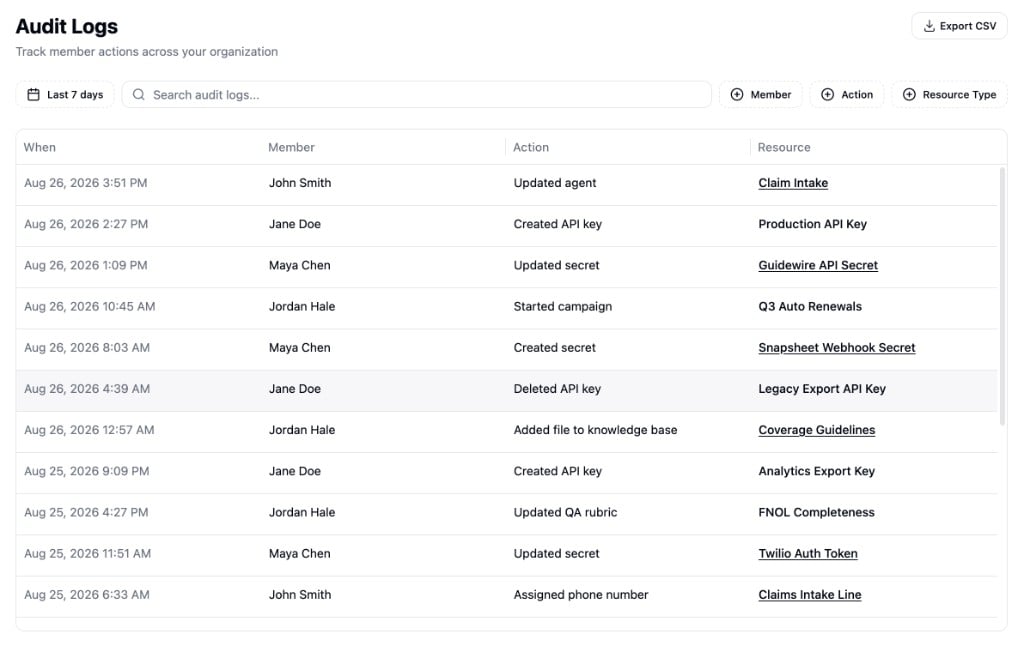
Each row is a single action. The table shows four columns:- When - The date and time the action happened.
- Member - The member who performed the action. Hover to see their email.
- Action - What they did, such as “Created agent” or “Deleted secret”.
- Resource - The specific item that was affected. When the item still exists, its name links to it, and you can copy its ID with the button.
Filtering and Search
Use the controls above the table to narrow down what you see:- Date range - Choose the time window to view. Defaults to the last 7 days.
- Search - Match against member name, email, action, and resource details.
- Member - Filter to actions by specific members.
- Action - Filter by action, such as Created, Updated, or Deleted.
- Resource Type - Filter by the kind of item affected, such as Agents or Secrets.
What Gets Tracked
Audit Logs record actions across your organization, grouped by the kind of resource affected:
Most resources record when they are created, updated, or deleted. Some add resource-specific actions: campaigns can be started, paused, or resumed, phone numbers can be assigned or unassigned, and knowledge bases track when files are added, updated, or removed.