Overview
Email Workflows use the same node-based architecture as Strada Workflows, allowing you to:- Automatically respond to incoming emails
- Process email content and extract information
- Trigger actions based on email content
- Integrate with external systems
- Apply conditional logic and flow control
Setting Up Email Workflow Domains
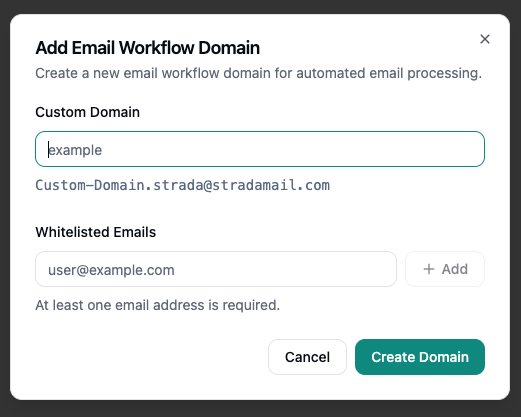
Before creating email workflows, you need to set up an email workflow domain. This domain provides the email address where you’ll forward emails to trigger your workflows.- Navigate to the Email Workflows section in your agent settings
- Click Add Workflow to setup a new workflow
- Enter a Custom Domain - this will be used to generate your unique email address in the format:
{customDomain}.strada@stradamail.com - Add Whitelisted Emails - specify which email addresses are allowed to forward emails to this workflow domain (at least one email address is required)
- Click Create Domain to complete the setup