> ## Documentation Index
> Fetch the complete documentation index at: https://docs.getstrada.com/llms.txt
> Use this file to discover all available pages before exploring further.
# Test Numbers
> Set test phone numbers so calls to or from them are automatically labeled as tests
## Overview
Test numbers let you designate specific phone numbers for testing. Any call made to or from a test number is automatically tagged with a **Test** badge in your [Conversations](/logs/conversations) page, making it easy to separate test calls from real ones.
 ***
## Adding a Test Number
Click **Add Test Number** in the top-right corner to open the dialog.
* **Phone Number** - Enter the number in E.164 format (e.g., `+18478903232`)
* **Label** - A required name to help you identify the number (e.g., "QA Team Phone")
Click **Add** to save. The phone number will appear in the table immediately.
## Managing Test Numbers
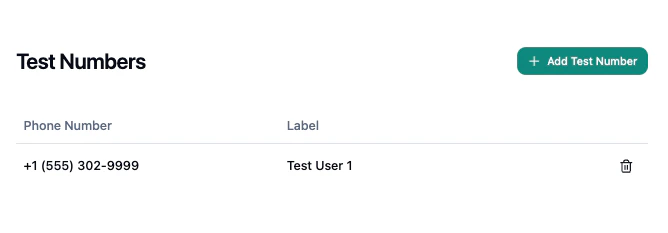
The table displays all configured test numbers with their phone number and label. To remove a test number, click the delete button on its row and confirm the deletion.
***
## Adding a Test Number
Click **Add Test Number** in the top-right corner to open the dialog.
* **Phone Number** - Enter the number in E.164 format (e.g., `+18478903232`)
* **Label** - A required name to help you identify the number (e.g., "QA Team Phone")
Click **Add** to save. The phone number will appear in the table immediately.
## Managing Test Numbers
The table displays all configured test numbers with their phone number and label. To remove a test number, click the delete button on its row and confirm the deletion.
 ## How Test Numbers Work
Once a number is added, any inbound or outbound call involving that number is automatically labeled as a test conversation. On the [Conversations](/logs/conversations) page, you can use the **Test** quick filter to toggle between showing only test conversations or all conversations including tests. The filter drawer also provides a **Test** option for more control.
## How Test Numbers Work
Once a number is added, any inbound or outbound call involving that number is automatically labeled as a test conversation. On the [Conversations](/logs/conversations) page, you can use the **Test** quick filter to toggle between showing only test conversations or all conversations including tests. The filter drawer also provides a **Test** option for more control.