> ## Documentation Index
> Fetch the complete documentation index at: https://docs.getstrada.com/llms.txt
> Use this file to discover all available pages before exploring further.
# Environments
> Define environments to manage different configurations for secrets and API connections
Environments let you maintain separate configurations for different stages of your workflow, such as production and development. Once you create environments, you can set environment-specific overrides for [secrets](/settings/organizations/secrets) and REST API connection groups.
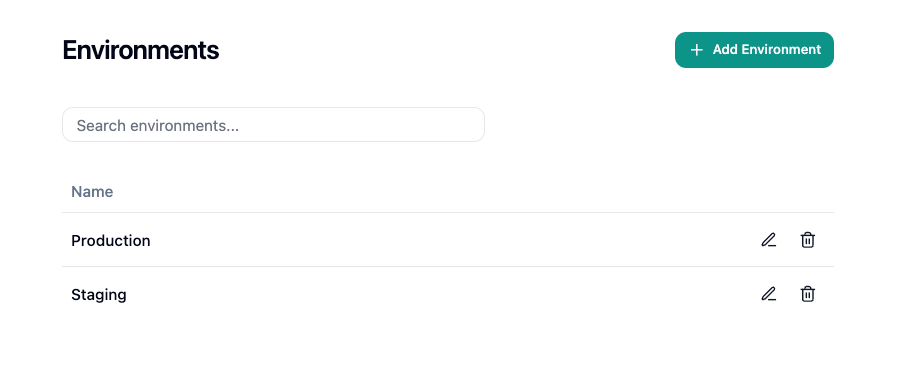
Navigate to **Settings > Organization > Environments** to manage your environments.
 ***
## Creating an Environment
Click **Add Environment** to open the creation dialog:
* **Name** - A unique label for the environment (e.g., "Production", "Development")
Environment names must be unique within your organization. Names are case-insensitive, so "Production" and "production" are treated as the same name.
***
## Editing an Environment
Click the pencil icon on an environment's row to rename it. The same uniqueness rules apply.
***
## Deleting an Environment
Click the trash icon on an environment's row and confirm the deletion. Any secret overrides or connection group mappings associated with the deleted environment will be removed.
***
## Using Environments
### Secret Overrides
When environments exist, the [Secrets](/settings/organizations/secrets) form shows an **Environment Overrides** section. This lets you store a different value for a secret in each environment. For example, an API key might point to a sandbox endpoint in development and a live endpoint in production.
Each secret has a default value that applies when no environment override matches. Add overrides by selecting an environment and entering the environment-specific value.
### Connection Group Overrides
REST API [connection groups](/settings/integrations/rest-api) can map each environment to a different connection. This lets workflows route API calls to the correct endpoint based on the active environment.
### Campaigns and Phone Numbers
Environments are assigned at the point where calls originate:
* **Campaigns** - Set an environment when [creating a campaign](/deployment/campaigns) so all outbound calls in that campaign use environment-specific connections and secrets.
* **Phone Numbers** - Set an environment when [configuring a phone number](/deployment/phone-numbers) so all inbound calls to that number use environment-specific connections and secrets.
***
## Searching
Use the search bar to filter environments by name.
***
## Visibility
Environments is only visible to Admin, IT Admin, and Executive roles. Creating, editing, and deleting environments requires Admin or IT Admin.
***
## Creating an Environment
Click **Add Environment** to open the creation dialog:
* **Name** - A unique label for the environment (e.g., "Production", "Development")
Environment names must be unique within your organization. Names are case-insensitive, so "Production" and "production" are treated as the same name.
***
## Editing an Environment
Click the pencil icon on an environment's row to rename it. The same uniqueness rules apply.
***
## Deleting an Environment
Click the trash icon on an environment's row and confirm the deletion. Any secret overrides or connection group mappings associated with the deleted environment will be removed.
***
## Using Environments
### Secret Overrides
When environments exist, the [Secrets](/settings/organizations/secrets) form shows an **Environment Overrides** section. This lets you store a different value for a secret in each environment. For example, an API key might point to a sandbox endpoint in development and a live endpoint in production.
Each secret has a default value that applies when no environment override matches. Add overrides by selecting an environment and entering the environment-specific value.
### Connection Group Overrides
REST API [connection groups](/settings/integrations/rest-api) can map each environment to a different connection. This lets workflows route API calls to the correct endpoint based on the active environment.
### Campaigns and Phone Numbers
Environments are assigned at the point where calls originate:
* **Campaigns** - Set an environment when [creating a campaign](/deployment/campaigns) so all outbound calls in that campaign use environment-specific connections and secrets.
* **Phone Numbers** - Set an environment when [configuring a phone number](/deployment/phone-numbers) so all inbound calls to that number use environment-specific connections and secrets.
***
## Searching
Use the search bar to filter environments by name.
***
## Visibility
Environments is only visible to Admin, IT Admin, and Executive roles. Creating, editing, and deleting environments requires Admin or IT Admin.