> ## Documentation Index
> Fetch the complete documentation index at: https://docs.getstrada.com/llms.txt
> Use this file to discover all available pages before exploring further.
# Pre-Call Workflows
> Run automations before a call connects to retrieve data, filter contacts, or route calls
## Overview
Pre-Call Workflows let you run automations before a call connects. Use them to look up customer data, update call variables, block unwanted calls, or route inbound calls to a different agent.
There are two types:
* **Outbound** - Runs before each campaign call is placed. Assigned to a campaign during creation.
* **Inbound** - Runs when an incoming call arrives, before the agent speaks. Assigned through the agent's [Incoming Call Personalization](/building/incoming-call-personalization) settings. Inbound workflows must complete within 5 seconds and do not support Delay or LLM nodes.
***
## Workflow List
Use the **Outbound** and **Inbound** tabs to filter workflows by type. Click **New Workflow** to create one - enter a name and select an agent. The call direction is determined by whichever tab is active.
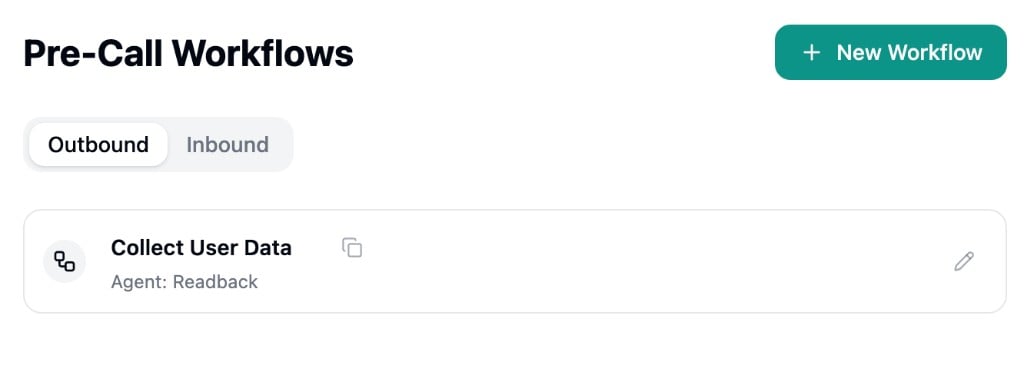 Each card displays the workflow name, linked agent, a button to copy the workflow ID, and a button to open the builder. Workflows are tied to a specific agent at creation and cannot be reassigned.
***
## Workflow Builder
Pre-call workflows use the same visual builder as [Strada Workflows](/building/strada-workflows). Refer to that page for details on building, testing, and publishing workflows.
The key differences for pre-call workflows are:
**Pre-call specific nodes**
* **Block Call** - Stop the call from being placed
* **Update Variables** - Merge variables into the call before it connects
* **Handoff** - Route to a different agent (inbound only)
* **Transfer Call** - Transfer to a destination number (inbound only)
**Constraints**
* Inbound workflows do not support Delay or LLM nodes
* Edits are auto-saved as a draft, but you must click **Publish Workflow** for changes to take effect in production
Each card displays the workflow name, linked agent, a button to copy the workflow ID, and a button to open the builder. Workflows are tied to a specific agent at creation and cannot be reassigned.
***
## Workflow Builder
Pre-call workflows use the same visual builder as [Strada Workflows](/building/strada-workflows). Refer to that page for details on building, testing, and publishing workflows.
The key differences for pre-call workflows are:
**Pre-call specific nodes**
* **Block Call** - Stop the call from being placed
* **Update Variables** - Merge variables into the call before it connects
* **Handoff** - Route to a different agent (inbound only)
* **Transfer Call** - Transfer to a destination number (inbound only)
**Constraints**
* Inbound workflows do not support Delay or LLM nodes
* Edits are auto-saved as a draft, but you must click **Publish Workflow** for changes to take effect in production
 ***
## Assigning Workflows
**Outbound** workflows are assigned when creating a new campaign. The dropdown shows outbound workflows matching the selected agent.
**Inbound** workflows are assigned through the agent's [Incoming Call Personalization](/building/incoming-call-personalization) settings. Select Pre-Call Workflow as the personalization source and choose a workflow.
A workflow only runs when it has been both published and assigned.
***
## Monitoring
Pre-call workflow runs appear in the **Workflow Runs** page with a "Pre-Call" type filter. Campaign views show a "Pre-Call" column linking to run details, and blocked calls display a "Blocked" status badge.
***
## Assigning Workflows
**Outbound** workflows are assigned when creating a new campaign. The dropdown shows outbound workflows matching the selected agent.
**Inbound** workflows are assigned through the agent's [Incoming Call Personalization](/building/incoming-call-personalization) settings. Select Pre-Call Workflow as the personalization source and choose a workflow.
A workflow only runs when it has been both published and assigned.
***
## Monitoring
Pre-call workflow runs appear in the **Workflow Runs** page with a "Pre-Call" type filter. Campaign views show a "Pre-Call" column linking to run details, and blocked calls display a "Blocked" status badge.