> ## Documentation Index
> Fetch the complete documentation index at: https://docs.getstrada.com/llms.txt
> Use this file to discover all available pages before exploring further.
# Simulations
> Test your agents with different personas and scenarios
Simulations allow you to test your agents comprehensively by running conversations with different personas and scenarios. Unlike [test cases](/building/testing), simulations enable you to test full conversation flows with realistic user personas, helping you validate agent behavior across various interaction patterns and use cases.
***
## Creating a Simulation
To create a new simulation, navigate to the **Simulations** section and click **Create Simulation**. You'll configure the following components:
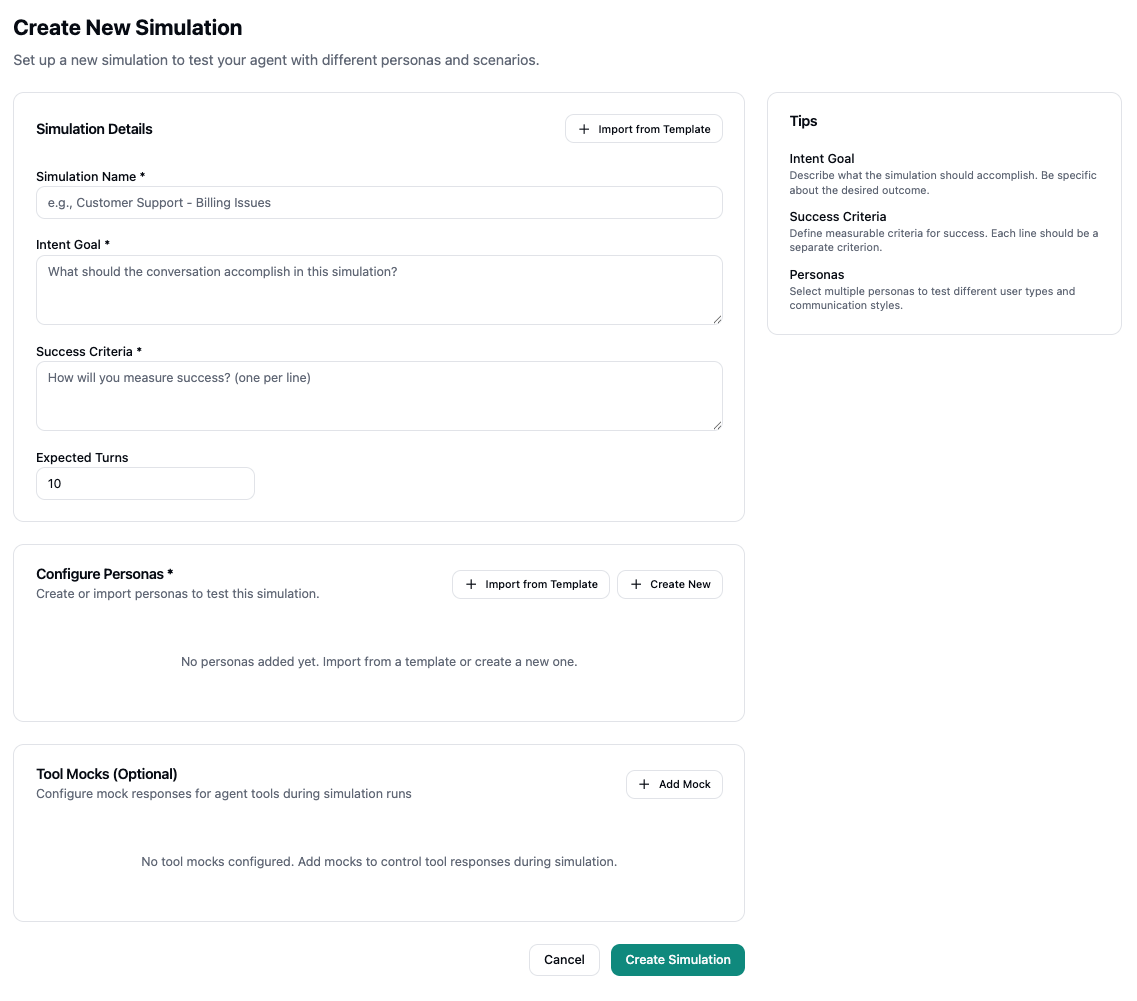 ### Simulation Details
**Simulation Name** - Give your simulation a descriptive name that clearly identifies its purpose (e.g., "Customer Support - Billing Issues").
**Intent Goal** - Define what the conversation should accomplish in this simulation. Be specific about the desired outcome and what success looks like.
**Success Criteria** - Specify how you'll measure success, with one criterion per line. These criteria help evaluate whether the simulation achieved its intended goal.
**Expected Turns** - Set the expected number of conversation turns. This helps the simulation understand the typical length of conversations for this scenario.
You can also click **Import from Template** to start from a pre-built security template (e.g., Prompt Injection Defense, Self-Harm Prevention) or an organization-specific template.
### Configure Personas
Personas represent different user types and communication styles that will interact with your agent during the simulation. You can:
* **Import from Template** - Use pre-configured personas from existing templates
* **Create New** - Build custom personas that match your target audience
Multiple personas can be added to test how your agent handles different user types, communication styles, and interaction patterns.
### Tool Mocks (Optional)
Tool mocks allow you to configure mock responses for agent tools during simulation runs. This is useful for:
* Testing agent behavior when tools return specific responses
* Simulating external system interactions
* Controlling tool outputs to test different scenarios
Add mocks to control how tools respond during simulation execution, enabling you to test various edge cases and system states.
***
## Running Simulations
Once your simulation is configured, you can run it to see how your agent performs across different personas and scenarios.
### Simulation Results Page
The simulation results page displays:
* **Simulation Details** - Shows your intent goal, success criteria, and key metrics including:
* Number of personas configured
* Personas passing rate (indicates how many personas met the success criteria)
* Last run time and total number of runs
* Expected turns
* **Simulation Results** - Results grouped by persona, with each persona card showing:
* Run status (Passed/Failed) with visual indicators
* Run timing information (when it ran, duration)
* Version information (agent version used for the run)
* Total runs for that persona
You can **Run All Personas** to test all configured personas at once, or re-run individual personas. Use the **View** button on any run to see detailed results.
### Viewing Runs
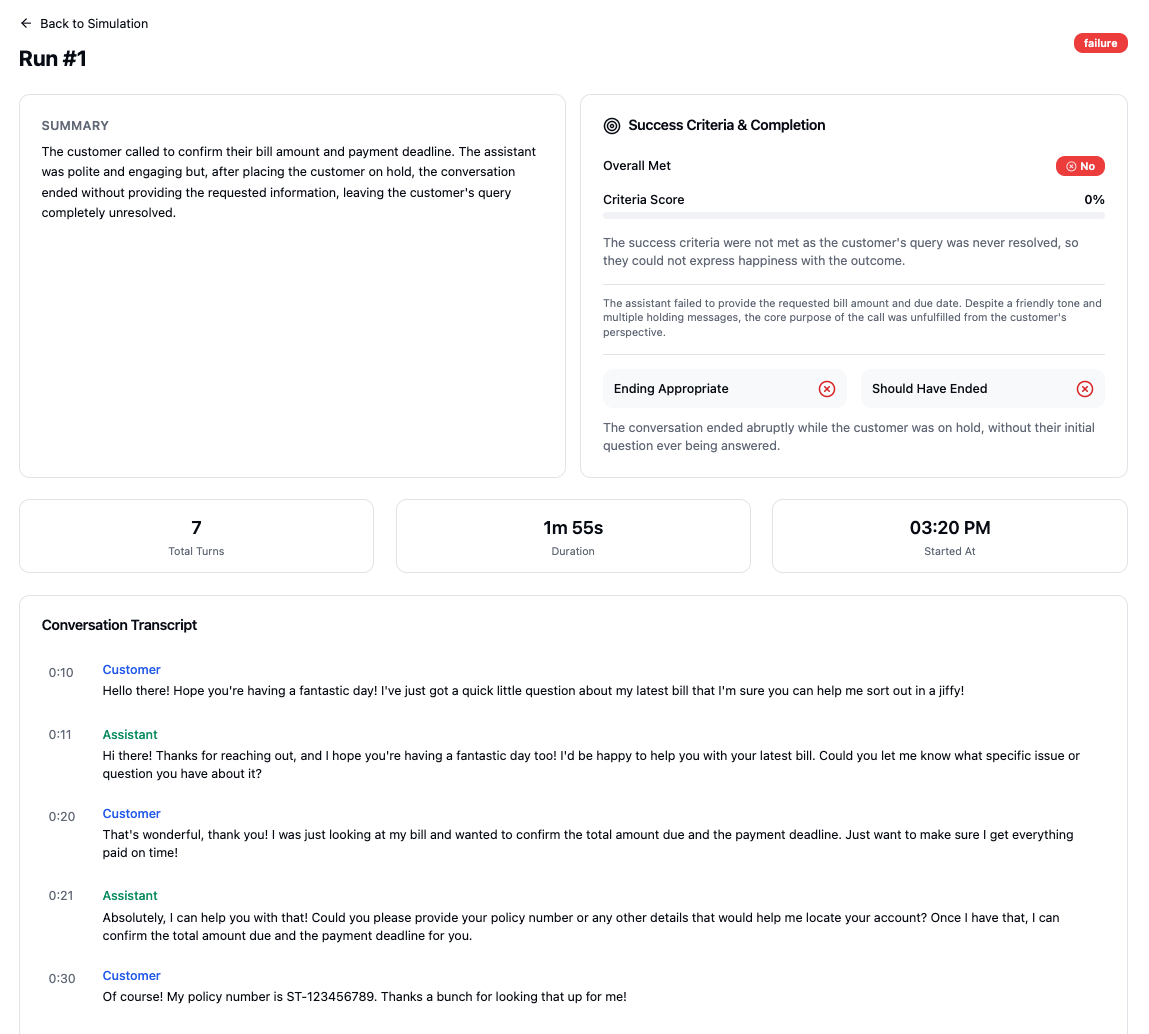
When viewing a specific run, you'll see:
* **Summary** - An AI-generated summary of how the conversation went
* **Success Criteria & Completion** - Whether the success criteria were met, with a criteria score percentage and detailed explanations
* **Key Metrics** - Total turns, duration, and start time
* **Conversation Transcript** - The complete conversation between the persona and your agent, including tool calls
This detailed view helps you understand exactly how your agent performed and identify specific areas for improvement.
### Simulation Details
**Simulation Name** - Give your simulation a descriptive name that clearly identifies its purpose (e.g., "Customer Support - Billing Issues").
**Intent Goal** - Define what the conversation should accomplish in this simulation. Be specific about the desired outcome and what success looks like.
**Success Criteria** - Specify how you'll measure success, with one criterion per line. These criteria help evaluate whether the simulation achieved its intended goal.
**Expected Turns** - Set the expected number of conversation turns. This helps the simulation understand the typical length of conversations for this scenario.
You can also click **Import from Template** to start from a pre-built security template (e.g., Prompt Injection Defense, Self-Harm Prevention) or an organization-specific template.
### Configure Personas
Personas represent different user types and communication styles that will interact with your agent during the simulation. You can:
* **Import from Template** - Use pre-configured personas from existing templates
* **Create New** - Build custom personas that match your target audience
Multiple personas can be added to test how your agent handles different user types, communication styles, and interaction patterns.
### Tool Mocks (Optional)
Tool mocks allow you to configure mock responses for agent tools during simulation runs. This is useful for:
* Testing agent behavior when tools return specific responses
* Simulating external system interactions
* Controlling tool outputs to test different scenarios
Add mocks to control how tools respond during simulation execution, enabling you to test various edge cases and system states.
***
## Running Simulations
Once your simulation is configured, you can run it to see how your agent performs across different personas and scenarios.
### Simulation Results Page
The simulation results page displays:
* **Simulation Details** - Shows your intent goal, success criteria, and key metrics including:
* Number of personas configured
* Personas passing rate (indicates how many personas met the success criteria)
* Last run time and total number of runs
* Expected turns
* **Simulation Results** - Results grouped by persona, with each persona card showing:
* Run status (Passed/Failed) with visual indicators
* Run timing information (when it ran, duration)
* Version information (agent version used for the run)
* Total runs for that persona
You can **Run All Personas** to test all configured personas at once, or re-run individual personas. Use the **View** button on any run to see detailed results.
### Viewing Runs
When viewing a specific run, you'll see:
* **Summary** - An AI-generated summary of how the conversation went
* **Success Criteria & Completion** - Whether the success criteria were met, with a criteria score percentage and detailed explanations
* **Key Metrics** - Total turns, duration, and start time
* **Conversation Transcript** - The complete conversation between the persona and your agent, including tool calls
This detailed view helps you understand exactly how your agent performed and identify specific areas for improvement.
 ***
## Best Practices
* **Be specific with intent goals** - Clearly define what the simulation should accomplish
* **Use measurable success criteria** - Each criterion should be a separate, testable metric
* **Test multiple personas** - Include different user types to validate agent behavior across various communication styles
* **Use tool mocks strategically** - Mock tool responses to test how your agent handles different system states
* **Set realistic expected turns** - Base this on actual conversation patterns you've observed
***
## Best Practices
* **Be specific with intent goals** - Clearly define what the simulation should accomplish
* **Use measurable success criteria** - Each criterion should be a separate, testable metric
* **Test multiple personas** - Include different user types to validate agent behavior across various communication styles
* **Use tool mocks strategically** - Mock tool responses to test how your agent handles different system states
* **Set realistic expected turns** - Base this on actual conversation patterns you've observed