> ## Documentation Index
> Fetch the complete documentation index at: https://docs.getstrada.com/llms.txt
> Use this file to discover all available pages before exploring further.
# Publishing & Versions
> Save drafts, publish changes, and manage agent versions
Strada uses a draft/publish model for agents. Changes you make in the Conversation Flow editor are saved as a draft first, then published to go live. Every publish creates a new version, giving you a full history of changes with the ability to compare and revert.
 ***
## Save Draft
As you edit your agent's conversation flow, persona, variables, voice, and other settings, those changes exist only in the editor. Click **Save Draft** to persist them.
* The button appears in the top-right of the Conversation Flow editor
* If you have unsaved changes, an "Unsaved changes" label appears next to the save button
* Saving a draft does not affect the live agent - callers and chat users continue to interact with the last published version
***
## Publish
Once your draft is saved, click **Publish** to make it live. Publishing:
* Deploys all saved changes to the live agent immediately
* Creates a new version in the version history
* Resets the draft state (draft and published are now identical)
The Publish button is only enabled when the draft has been saved and contains changes that differ from the current published version.
Publishing the agent does not publish its workflows. Workflows have their own independent publish model. See
[Workflows](/building/conversation-flow/workflows/workflows-overview) for details.
***
## Version History
Access version history by clicking the **Versions** button in the Conversation Flow editor.
The Versions page shows a resizable split view:
* **Right panel** - A list of all published versions, ordered newest to oldest, each showing a timestamp and who published it
* **Left panel** - A detailed diff comparing two versions
### Comparing Versions
By default, the diff compares your current draft against the selected version. If no draft changes exist, it compares the latest published version against the selected version.
***
## Save Draft
As you edit your agent's conversation flow, persona, variables, voice, and other settings, those changes exist only in the editor. Click **Save Draft** to persist them.
* The button appears in the top-right of the Conversation Flow editor
* If you have unsaved changes, an "Unsaved changes" label appears next to the save button
* Saving a draft does not affect the live agent - callers and chat users continue to interact with the last published version
***
## Publish
Once your draft is saved, click **Publish** to make it live. Publishing:
* Deploys all saved changes to the live agent immediately
* Creates a new version in the version history
* Resets the draft state (draft and published are now identical)
The Publish button is only enabled when the draft has been saved and contains changes that differ from the current published version.
Publishing the agent does not publish its workflows. Workflows have their own independent publish model. See
[Workflows](/building/conversation-flow/workflows/workflows-overview) for details.
***
## Version History
Access version history by clicking the **Versions** button in the Conversation Flow editor.
The Versions page shows a resizable split view:
* **Right panel** - A list of all published versions, ordered newest to oldest, each showing a timestamp and who published it
* **Left panel** - A detailed diff comparing two versions
### Comparing Versions
By default, the diff compares your current draft against the selected version. If no draft changes exist, it compares the latest published version against the selected version.
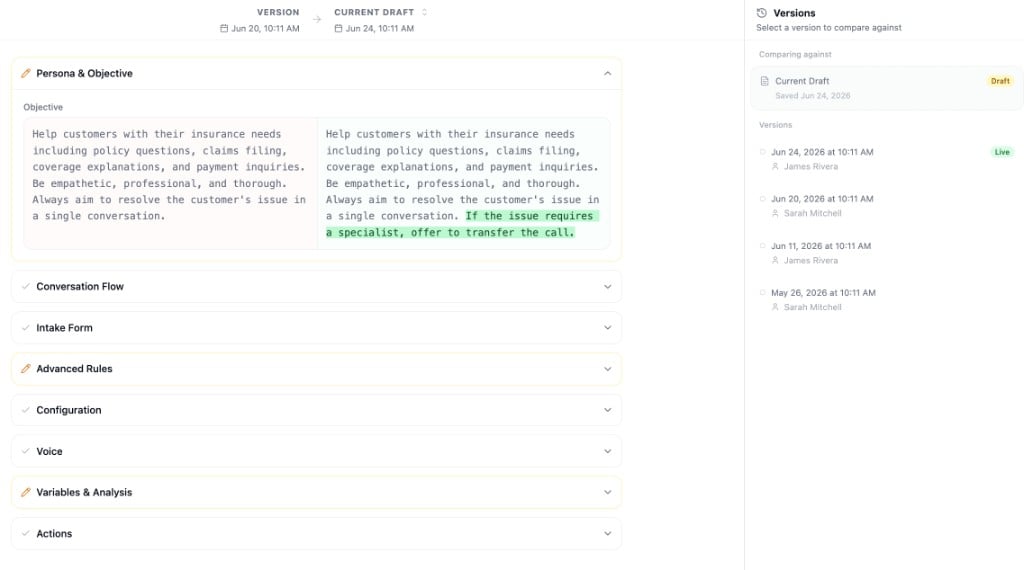 The diff is organized into sections that match the Conversation Flow editor:
* **Persona & Objective** - Changes to the agent's persona and objective
* **Conversation Flow** - Added, removed, or modified nodes
* **Advanced Rules** - Changes to advanced rules (shared, call-only, and chat-only)
* **Configuration** - Knowledge base, voicemail, dial keypad, and interactive component changes
* **Voice** - Voice selection, speed, and background sound changes
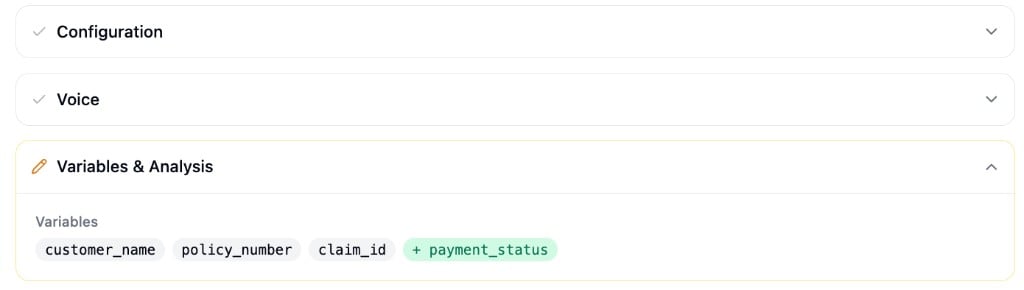
* **Variables & Analysis** - Variable definitions, secure metadata keys, and call analysis settings
* **Actions** - Workflow configuration and action setting changes
Each section collapses when there are no changes, so you can quickly scan what's different.
The diff is organized into sections that match the Conversation Flow editor:
* **Persona & Objective** - Changes to the agent's persona and objective
* **Conversation Flow** - Added, removed, or modified nodes
* **Advanced Rules** - Changes to advanced rules (shared, call-only, and chat-only)
* **Configuration** - Knowledge base, voicemail, dial keypad, and interactive component changes
* **Voice** - Voice selection, speed, and background sound changes
* **Variables & Analysis** - Variable definitions, secure metadata keys, and call analysis settings
* **Actions** - Workflow configuration and action setting changes
Each section collapses when there are no changes, so you can quickly scan what's different.
 ### Reverting to a Previous Version
Select any version from the list and click **Revert to this version** at the bottom of the diff panel. This restores and publishes all agent settings from that version immediately.
Reverting is immediate and goes live right away. The reverted state becomes the new published version.
### Reverting to a Previous Version
Select any version from the list and click **Revert to this version** at the bottom of the diff panel. This restores and publishes all agent settings from that version immediately.
Reverting is immediate and goes live right away. The reverted state becomes the new published version.