> ## Documentation Index
> Fetch the complete documentation index at: https://docs.getstrada.com/llms.txt
> Use this file to discover all available pages before exploring further.
# REST API
> Connect your Strada Voice agents with custom REST APIs
## Overview
The REST API app allows your agent to seamlessly integrate with custom APIs and external services, enabling real-time data exchange and automation during conversations. This integration is perfect for connecting to proprietary systems, third-party APIs, and custom workflows directly through your agent.
***
## How to configure REST API
**Step 1: Navigate to the REST API app**
In your Strada dashboard, navigate to the **Apps** section in the left sidebar, then locate and click on **REST API** to begin the configuration process.
**Step 2: Configure your API settings**
Click the **Connect** button to open the REST API configuration dialog. You'll need to provide the following information:
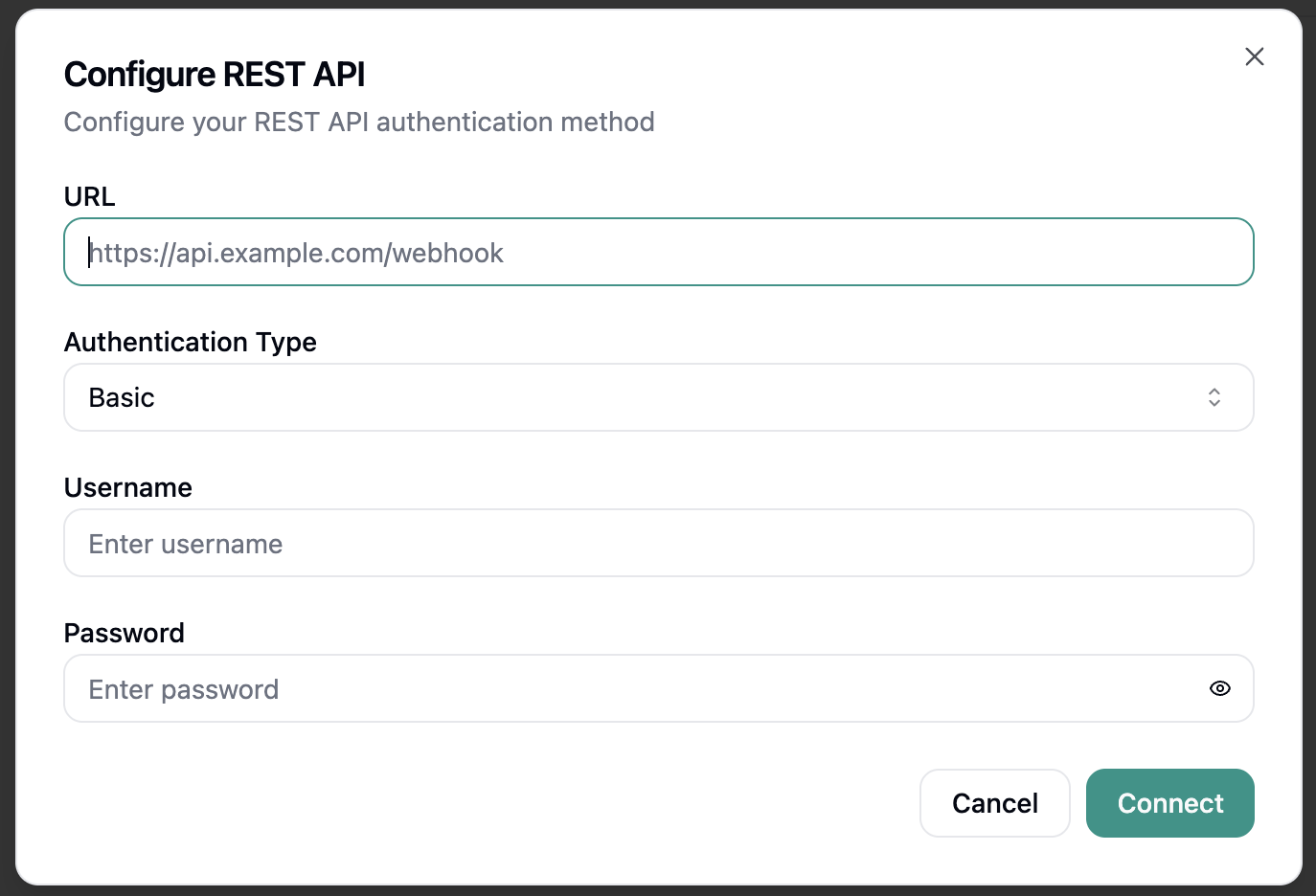 * **Base URL**: Your API endpoint base URL (e.g., `https://api.yourcompany.com`)
* **Authentication Type**: Choose between API Key, Bearer Token, or Basic Auth
* **Username**: Your API username or email address
* **Password**: Your API password or authentication token
**Step 3: Test and save your configuration**
After entering your API credentials, click **Connect** to test the connection and save your configuration. Strada will verify that it can successfully connect to your API endpoint.
***
## Available REST API Actions
Once connected, your agent can perform the following actions:
### During Conversations (In-Conversation Actions)
* **Send POST Request** - Send HTTP POST requests to your custom API during conversations
See the [In-Conversation Actions](/building/actions/in-call-actions) documentation for detailed information on configuring REST API actions.
***
## REST API Permissions
The REST API integration requires the following permissions:
* **Send HTTP requests**: Permission to make API calls to your configured endpoints
* **Read response data**: Access to process API responses and extract relevant information
These permissions are essential for Strada Voice to perform the configured REST API actions effectively. You
can review and manage API access within your external service's security settings.
***
## Security Best Practices
* Use HTTPS endpoints for all API communications
* Implement proper authentication and authorization
* Regularly rotate API keys and tokens
* Monitor API usage and rate limits
* Validate and sanitize all data sent to external APIs
* Keep your API credentials secure and never share them publicly
***
* **Base URL**: Your API endpoint base URL (e.g., `https://api.yourcompany.com`)
* **Authentication Type**: Choose between API Key, Bearer Token, or Basic Auth
* **Username**: Your API username or email address
* **Password**: Your API password or authentication token
**Step 3: Test and save your configuration**
After entering your API credentials, click **Connect** to test the connection and save your configuration. Strada will verify that it can successfully connect to your API endpoint.
***
## Available REST API Actions
Once connected, your agent can perform the following actions:
### During Conversations (In-Conversation Actions)
* **Send POST Request** - Send HTTP POST requests to your custom API during conversations
See the [In-Conversation Actions](/building/actions/in-call-actions) documentation for detailed information on configuring REST API actions.
***
## REST API Permissions
The REST API integration requires the following permissions:
* **Send HTTP requests**: Permission to make API calls to your configured endpoints
* **Read response data**: Access to process API responses and extract relevant information
These permissions are essential for Strada Voice to perform the configured REST API actions effectively. You
can review and manage API access within your external service's security settings.
***
## Security Best Practices
* Use HTTPS endpoints for all API communications
* Implement proper authentication and authorization
* Regularly rotate API keys and tokens
* Monitor API usage and rate limits
* Validate and sanitize all data sent to external APIs
* Keep your API credentials secure and never share them publicly
***