> ## Documentation Index
> Fetch the complete documentation index at: https://docs.getstrada.com/llms.txt
> Use this file to discover all available pages before exploring further.
# Campaign Monitor
> Connect your Strada Voice agents with Campaign Monitor for email marketing
## Overview
The Campaign Monitor app allows your agent to seamlessly integrate with Campaign Monitor's email marketing platform, enabling automatic subscriber management and list growth during conversations. This integration is perfect for adding subscribers to email lists, managing marketing campaigns, and growing your email marketing audience directly through your agent.
***
## How to configure Campaign Monitor
**Step 1: Navigate to the Campaign Monitor app**
In your Strada dashboard, navigate to the **Apps** section in the left sidebar, then locate and click on **Campaign Monitor** to begin the configuration process.
**Step 2: Configure your API credentials**
Click the **Connect** button to open the Campaign Monitor configuration dialog. You'll need to provide the following information:
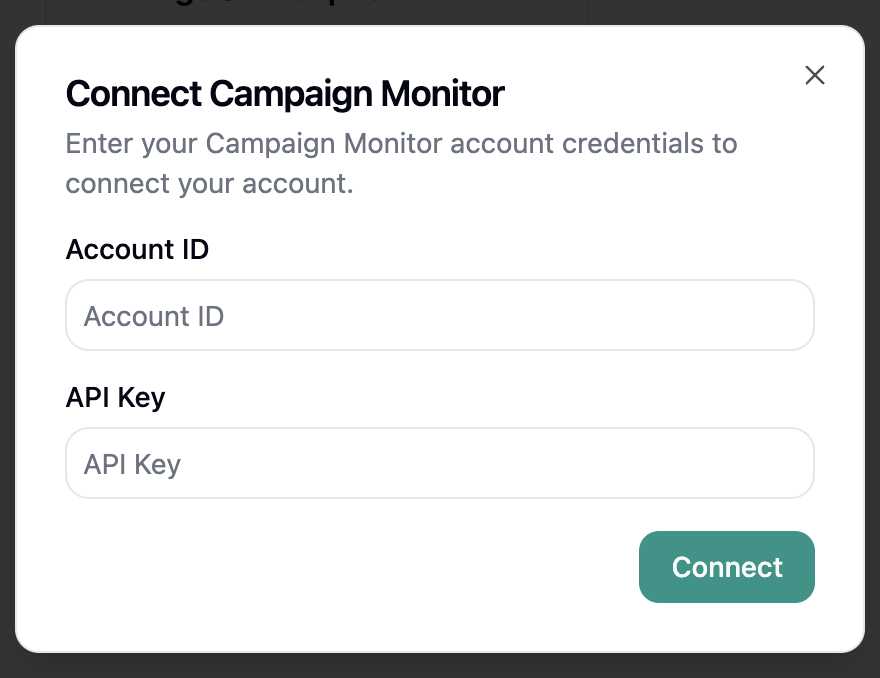 * **Account ID**: Your Campaign Monitor account identifier
* **API Key**: Your Campaign Monitor API key from your account settings
**Step 3: Test and save your configuration**
After entering your Campaign Monitor credentials, click **Connect** to test the connection and save your configuration. Strada will verify that it can successfully connect to your Campaign Monitor account.
***
## Available Campaign Monitor Actions
Once connected, your agent can perform the following actions:
### During Conversations (In-Conversation Actions)
* **Add Subscriber** - Add subscribers to your Campaign Monitor email lists during conversations
See the [In-Conversation Actions](/building/actions/in-call-actions) documentation for detailed information on configuring Campaign Monitor actions.
***
## Campaign Monitor Permissions
The Campaign Monitor integration requires the following permissions:
* **Add subscribers**: Permission to add new subscribers to your email lists
* **Read lists**: Access to view your Campaign Monitor lists and subscriber data
* **Create custom fields**: Permission to add custom fields to subscriber records
These permissions are essential for Strada Voice to perform the configured Campaign Monitor actions
effectively. You can review and manage these permissions within your Campaign Monitor account settings under
**Account** → **API Keys**.
***
## Security Best Practices
* Keep your Campaign Monitor API key secure and never share it publicly
* Regularly monitor your email list growth and subscriber additions
* Set up proper consent and opt-in processes for subscriber additions
* Monitor Campaign Monitor usage to verify proper list management
* Keep your Campaign Monitor account secured with strong passwords and two-factor authentication
***
* **Account ID**: Your Campaign Monitor account identifier
* **API Key**: Your Campaign Monitor API key from your account settings
**Step 3: Test and save your configuration**
After entering your Campaign Monitor credentials, click **Connect** to test the connection and save your configuration. Strada will verify that it can successfully connect to your Campaign Monitor account.
***
## Available Campaign Monitor Actions
Once connected, your agent can perform the following actions:
### During Conversations (In-Conversation Actions)
* **Add Subscriber** - Add subscribers to your Campaign Monitor email lists during conversations
See the [In-Conversation Actions](/building/actions/in-call-actions) documentation for detailed information on configuring Campaign Monitor actions.
***
## Campaign Monitor Permissions
The Campaign Monitor integration requires the following permissions:
* **Add subscribers**: Permission to add new subscribers to your email lists
* **Read lists**: Access to view your Campaign Monitor lists and subscriber data
* **Create custom fields**: Permission to add custom fields to subscriber records
These permissions are essential for Strada Voice to perform the configured Campaign Monitor actions
effectively. You can review and manage these permissions within your Campaign Monitor account settings under
**Account** → **API Keys**.
***
## Security Best Practices
* Keep your Campaign Monitor API key secure and never share it publicly
* Regularly monitor your email list growth and subscriber additions
* Set up proper consent and opt-in processes for subscriber additions
* Monitor Campaign Monitor usage to verify proper list management
* Keep your Campaign Monitor account secured with strong passwords and two-factor authentication
***